Block DNS Exfiltration and Data Smuggling Beta
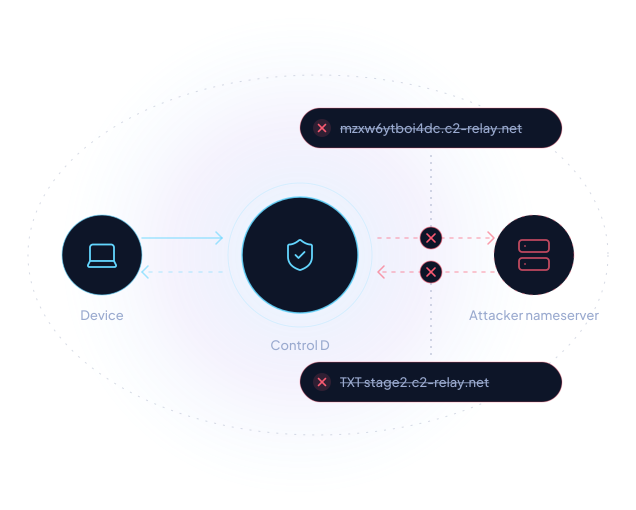
DNS is open in both directions
Almost every network lets DNS through, because nothing works without it. Attackers use that to carry stolen data out of devices and deliver malicious payloads in, turning DNS into a two-way channel known as DNS tunneling.What is DNS exfiltration?
DNS exfiltration is a technique where malware on a device hides stolen data inside the domain names it looks up. Each lookup carries a fragment of the data to a nameserver the attacker controls, which collects the fragments and puts them back together.
How Control D stops it
Control D inspects the subdomains in outgoing DNS queries and blocks those carrying encoded text, so the hidden data never reaches the attacker's nameserver.
What is data smuggling?
Data smuggling works in the opposite direction. The attacker's nameserver hides a payload, such as malware or commands, inside its DNS answers, and the infected device pulls it in one answer at a time.
How Control D stops it
Control D blocks lookups for the DNS record types most often used to carry hidden payloads, which everyday client devices rarely need. It also blanks the fields in "domain not found" answers that attackers could otherwise use as a hiding place.
What about DNS tunneling?
Because DNS tunneling relies on the same encoded queries and record types, these protections also help disrupt common tunneling techniques.
Protection without another product to manage
There's nothing new to buy or deploy. Switch it on in a Profile, and every Endpoint using that Profile is covered.Step 1: Open your Profile
In the Control D dashboard, go to Profiles and select the Profile you want to protect.
Step 2: Enable Block DNS Exfiltration
Open Profile Options and switch on Block DNS Exfiltration, directly below AI Malware Filter.
Step 3: Keep servers separate
Put servers on their own Profile with the setting turned off.
One layer of your DNS security
DNS Exfiltration Blocking works best alongside the rest of Control D.Malware Blocking
Stops devices reaching known malicious domains.
DNS Filtering
Controls which categories and services resolve.
AI Agent Security
Keeps AI agents within the destinations you allow.
We recommend running it with your endpoint and network controls rather than relying on any single layer.

GitHub

Network Information Technologies, LLC

Pinnacle ICT
Frequently asked questions
DNS exfiltration sends data out of a device by hiding it in the domain names the device looks up. Data smuggling brings data in by hiding it in the DNS answers the device receives. DNS Exfiltration Blocking covers both.
It helps disrupt common DNS tunneling techniques, since tunnels rely on the same encoded queries and record types the feature blocks. Some tunneling tools can adapt to work around these protections, so we treat it as one layer of defense against tunneling rather than complete protection.
Client devices such as laptops, desktops and phones, which almost never need the record types this feature blocks. Servers that depend on unmodified DNS answers, such as web and mail servers, should go on a separate Profile with the setting turned off.
DNS Exfiltration Blocking is included on every Control D plan.
The lookup is blocked, so hidden data in the query never leaves the network and nothing hidden in an answer reaches the device.
We're still refining how exfiltration is detected and would rather say so upfront. The protections against payload delivery are fixed rules.
Our documentation covers how the feature works and how to configure it.
Yes. Control D offers a free trial for all organizations. Sign up with your business email to test it, no credit card required.