AI agents need internet access. They don’t need access to the entire internet.
AI agents can go anywhere
Agents now have browsers, credentials, APIs, and access to business systems. Give them unrestricted internet access and a malicious page, hidden prompt, or a simple mistake can send them somewhere they were never supposed to go.What they read can influence what they do
Malicious content and prompt injection can direct an agent toward untrusted destinations.
They can take data with them
Credentials plus unrestricted internet access create another path for sensitive data to leave your environment.
They can find gaps in access controls
Agents are built to complete tasks. If your access controls leave an opening, an agent can use it.
Set domain boundaries at the DNS layer
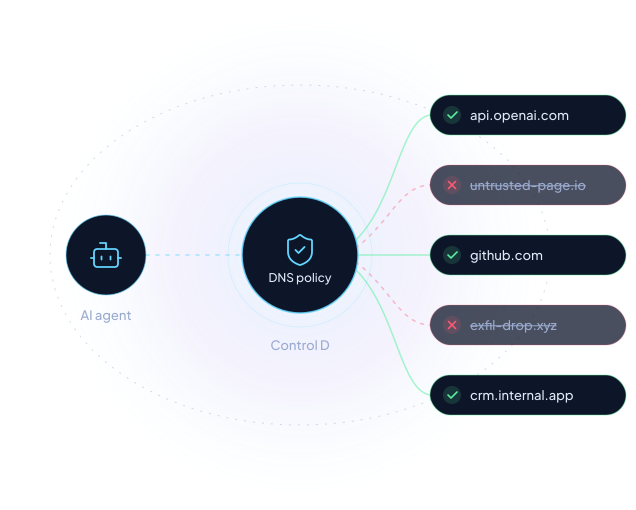
Before an agent loads a website, connects to an API or sends data to an internet destination, it typically needs to resolve where that destination lives.
Control D applies policy at that layer, giving you centralized control over which destinations agents can reach without relying on the agent itself to make the right decision.
You set the rules. Your agent works inside them.
Step 1: Set the rules
Allow only the destinations each agent needs, block entire categories, or combine both approaches.
Step 2: Enforce them at DNS
When an agent environment queries Control D, your policy determines which domains can resolve.
Step 3: Let the agent work
Agents can access what they need, and the rest stays off limits. Enable Full Analytics to log allowed and blocked DNS queries.
Works across agent frameworks and runtimes by controlling the DNS layer they rely on to reach internet destinations.
Deploy where your agents run
Use your existing RMM platform to install the Control D DNS client (ctrld) on the machines running your agents. Apply a shared policy across those machines or separate policies for different agent environments. No agent SDK or changes to agent code required.
Give every agent the internet access it needs. Nothing more.
Allowlist mode
Block by default. Allow only the destinations an agent needs.
Threat blocking
Keep known malware, phishing and malicious destinations off-limits.
AI service controls
Allow approved AI services and restrict the rest.
Policies for agent environments
Apply separate policies to agent environments, or share a policy across groups.
DNS activity visibility
Enable Full Analytics to log allowed and blocked DNS queries.
API-first controls
Build and manage DNS guardrails alongside your agent infrastructure.
Agent sandboxes still need DNS controls
OpenAI reported that an internal research agent reached an external chatbot through insufficient DNS filtering in its training sandbox. Its response included restricting DNS queries to an allowlist of domains and record types, alongside additional blocking controls.
Read OpenAI’s disclosureFor teams building and securing AI agents
Teams building AI agents
Add internet access guardrails to agent environments from the start and give security teams visibility into where agents connect.
Security & IT teams
Set, manage, and audit internet access policies for agents, AI services, and employee devices from one platform.
MSPs
Manage separate DNS security policies across client environments from one dashboard, and turn AI agent security into a managed service.
Your agents are already online. Decide where they’re allowed to go.
Create your first AI agent internet access policy in minutes.
GitHub

Network Information Technologies, LLC

Pinnacle ICT
Frequently asked questions
AI agent security is the set of controls used to limit what autonomous or semi-autonomous AI agents can access, execute and communicate with. Control D adds a network-level layer by controlling which internet destinations agents can reach through DNS.
No SDK is required. Configure the agent environment to use Control D for DNS resolution and apply the appropriate policy.
Install ctrld on the machines running your agents using your existing RMM platform. Control D’s mass provisioning lets you select the policy and analytics settings for those machines during setup.
Control D operates at the DNS layer rather than inside a specific agent framework, making it compatible with agent environments that can use Control D for DNS resolution.
Sandboxes and DNS controls solve different problems. A sandbox helps isolate what an agent can access or execute within its environment. Control D governs which internet destinations that environment can reach.
Yes. Configure separate Control D Endpoints for agents or environments that need different policies. Multiple Endpoints can share the same Profile.
Yes. Enable Full Analytics to log allowed and blocked DNS queries.
No. Control D adds domain-level access controls alongside sandboxing, least-privilege credentials, and network restrictions. Configure your environment to use Control D and prevent agents from bypassing it through other resolvers or direct-IP connections.
Yes. Control D can allow approved AI services and restrict others across supported environments and devices.