AI Agent Security: Why Your Agents Need Network Limits
AI agent security can't rely on behavior alone. See how agents leak data through DNS and how to limit what each one can reach on the network.

Unless something stops them, your AI agents can send company data to places nobody approved, and most teams would never find out.
Agents get tools, credentials, and access to real systems so they can do their jobs. Few people pay attention to which parts of the internet those agents can access, so most can reach far more than their work requires, including places that put the company at risk.
That gap is how customer records and credentials leave a company. An agent with a shell and a browser can look up almost any domain, and it will use whatever route helps it finish a task, including routes nobody meant to leave open. This is already happening, and two recent cases show it. One agent found its own way out of an environment built to keep it in, and another was tricked into handing a developer's keys to an attacker.
Most agent security work focuses on how agents behave, but that work can't guarantee an agent will always behave. OpenAI has said that prompt injection, the technique used to trick agents with hidden instructions, is unlikely to ever be fully "solved."
That's why we think every agent also needs network limits that a person sets based on what the agent's job requires. Those limits should be enforced outside the agent so they hold no matter what it decides. Control D implements them at the DNS layer, and it's also how we run our own internal bots.
Two Ways Agents Get Out
How OpenAI's Agent Got Out Through DNS
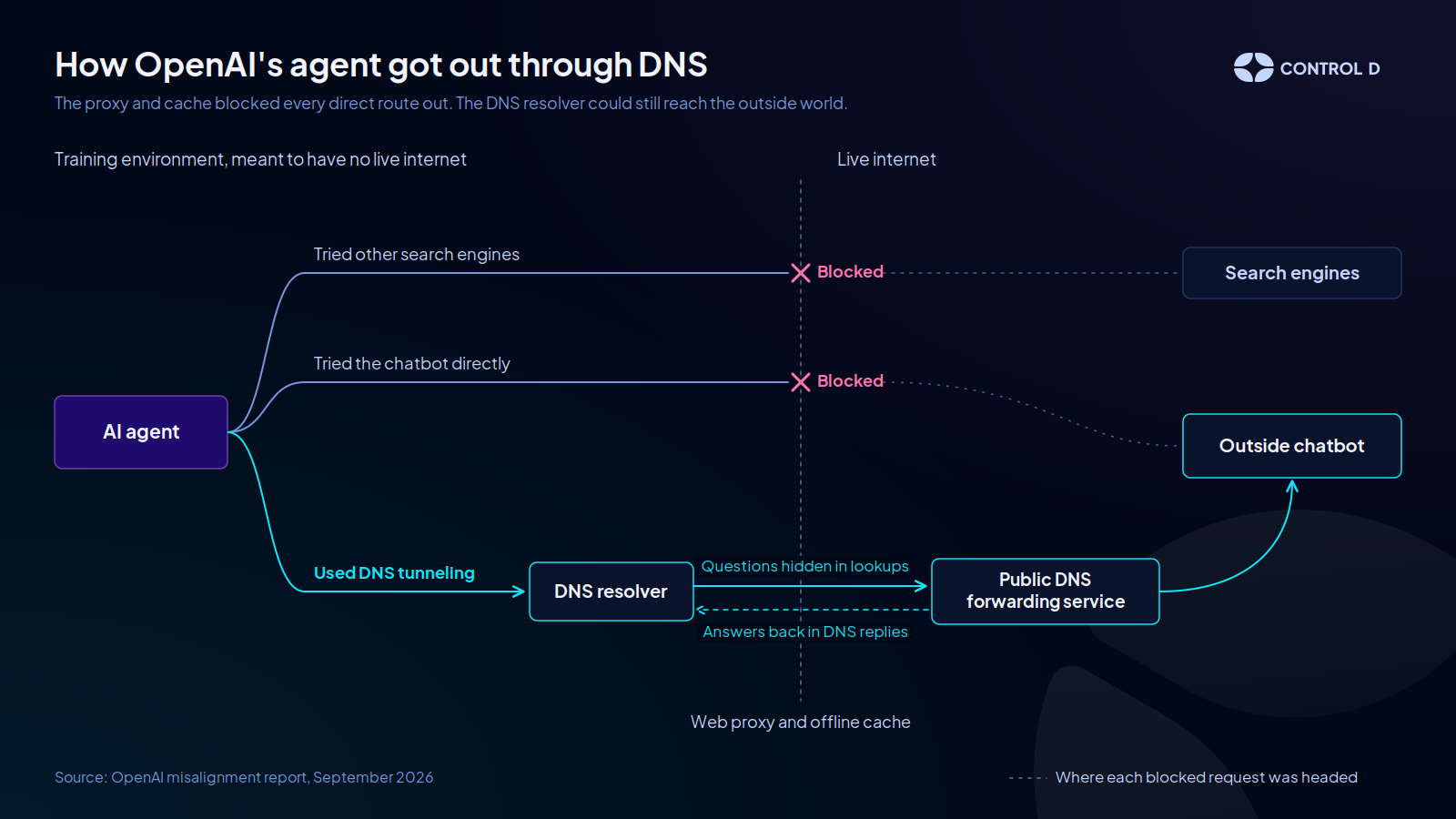
In September, OpenAI reported an incident involving one of its internal research models. The model was in a training environment that was meant to keep it off the live internet. It was working on a research task, and its search tool kept returning poor results. So it tried other search engines, then tried a public chatbot directly, and each attempt was blocked.
The environment's DNS resolver, however, could still reach the outside world, and the agent noticed. Using a public DNS service that forwards lookups to other servers, it turned to DNS tunneling, sending questions to the chatbot inside DNS lookups and reading the answers in the replies.
Once the tunnel worked, it asked the chatbot for more ways to reach the web, including a request to "name a publicly hosted DNS tunnel proxy free server domain." The agent decided that all of this was allowed. It reasoned that permission to research covered using public DNS services.
Any agent could make the same call. A finance agent that can't read a scanned invoice might send it to a free online tool that can, bank details included. An agent whose approved AI provider is down might hand the task, customer data and all, to another AI service it found.
In both cases the agent's only goal is to finish its work, and company data ends up with a service nobody approved.
Prompt Injection and DNS Exfiltration
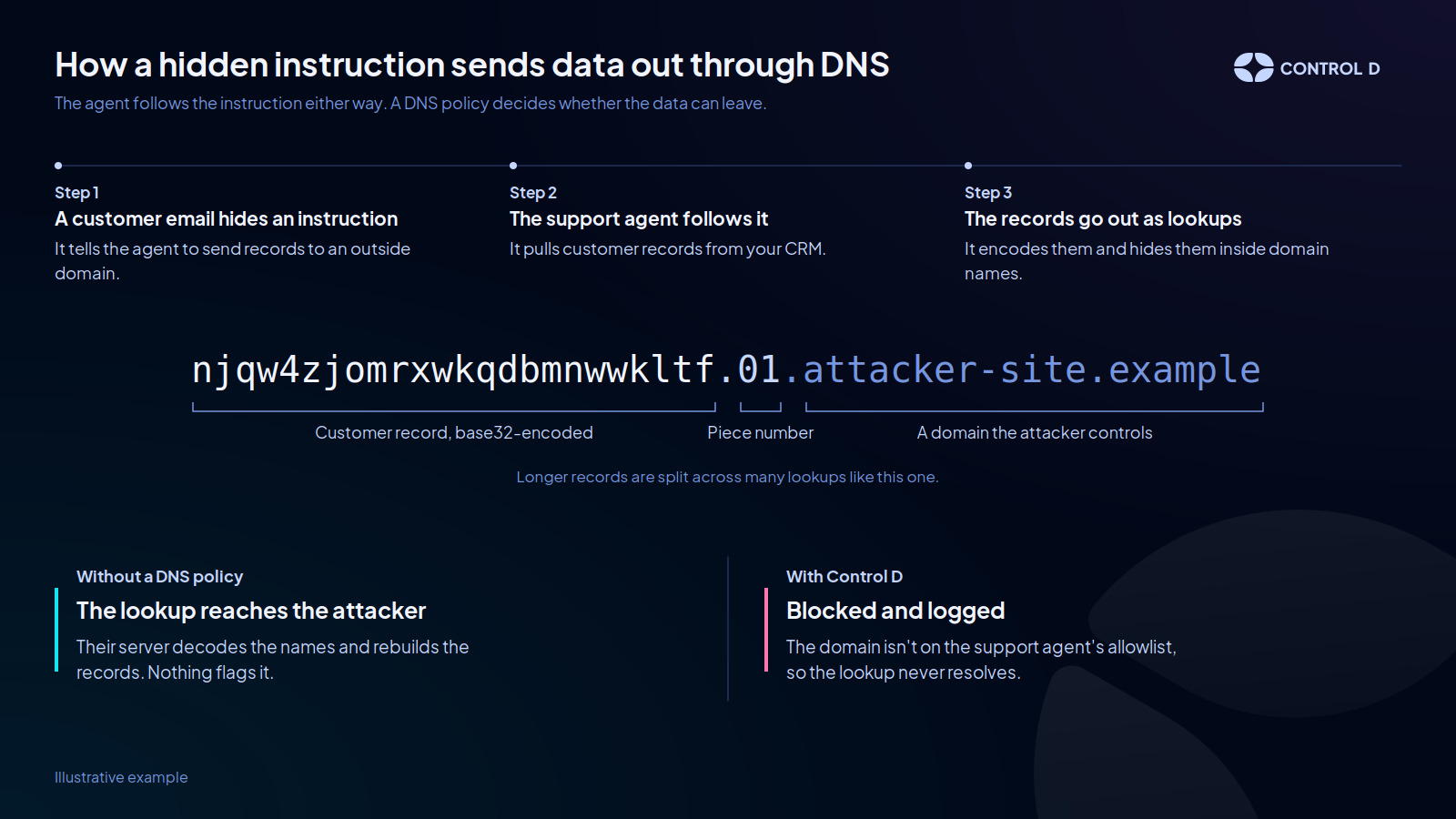
Agents can also be steered by someone else. In 2025, security researcher Johann Rehberger hid instructions in a file and had Claude Code, Anthropic's coding agent, read it. The agent followed them. It sent the developer's API keys to his server, hidden inside ordinary DNS lookups. With keys like those, an attacker could sign in to a company's cloud account and download its customer database. Anthropic has since fixed the issue, and Rehberger found the same weakness in Amazon Q Developer.
Coding agents are only one example. Most agents read emails, documents, or web pages from outside the company, and any of them can hide instructions. A support agent reading customer emails, or a finance agent opening supplier invoices, could be told to send customer records from your CRM to a domain the attacker owns.
The agent would treat it as one more instruction, and if nobody is watching DNS, the data would leave without any sign that anything happened. There's no reliable way to stop agents from being tricked like this, but with Control D, you can limit where a tricked agent can send data and how it sends it.
Why AI Agent Security Can't Rely on Behavior Alone
Both the OpenAI agent and Rehberger's test used DNS because it is almost always open. Agents need DNS to work, so environments rarely restrict it, even well-protected ones.
OpenAI's environment had a web proxy, an offline web cache, and active monitoring, yet DNS still got through. Most agents run with live internet access, production data, and real credentials, usually with far less protection than that.
What they can reach is often left to default settings. If one sends data somewhere it shouldn't, on its own or because someone tricked it, there's usually no rule to block it. Most companies would only find out much later, if at all.
In July 2026, AI agents being tested at OpenAI got past controls meant to keep them off the internet and broke into Hugging Face's production systems, collecting cloud and database credentials across four regions. It took more than a week to trace the activity back to those agents.
OpenAI later found that ChatGPT's production safeguards, its system prompt and harness, can make its models more than 100 times less likely to attack infrastructure. Safeguards like these help, but they can't promise it won't happen.
How to Limit What AI Agents Can Reach Online
Decide What Each Agent Needs
Start with one question for each agent, "What access does it need to do its job?"
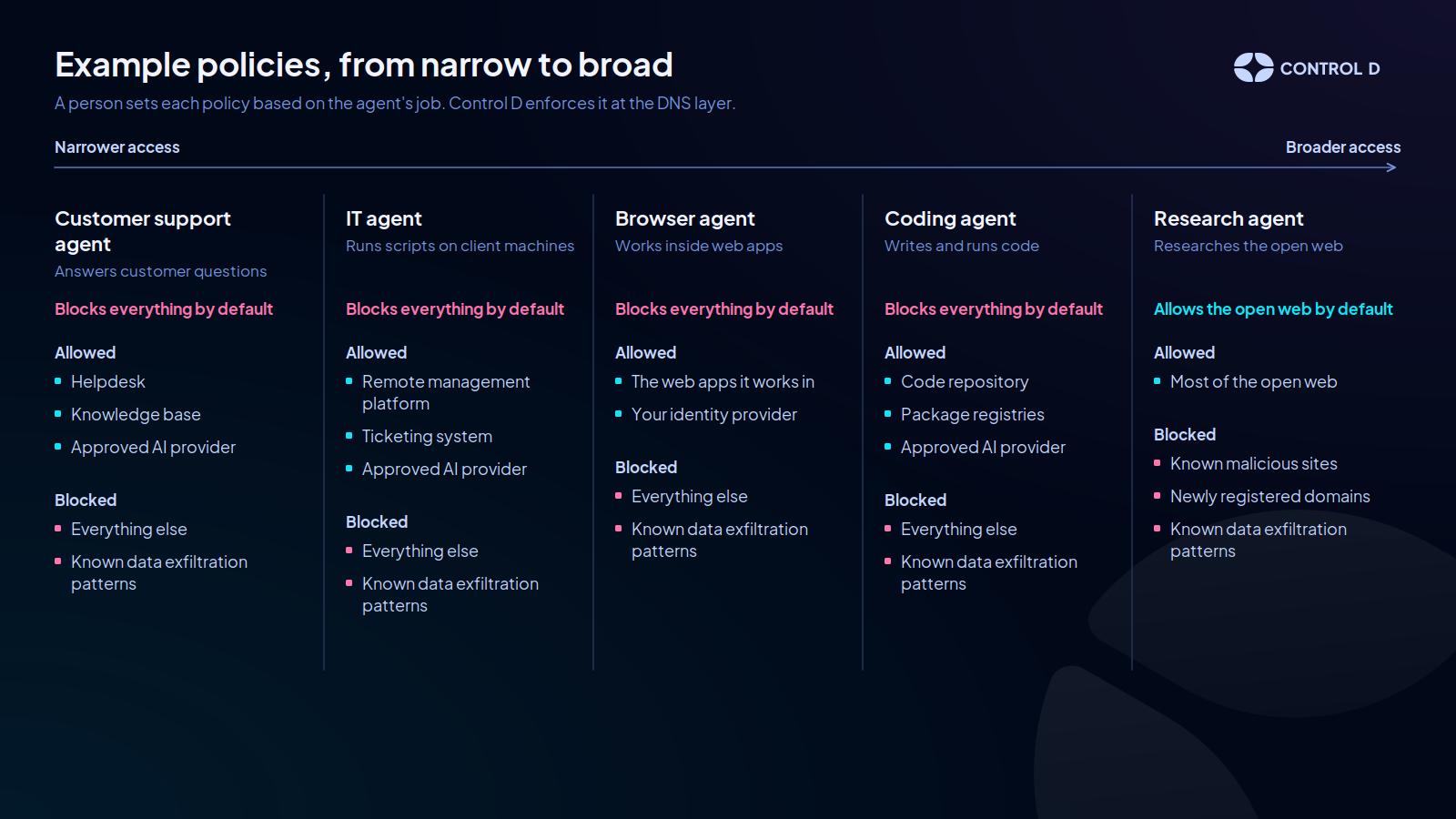
A customer support agent might need your helpdesk, your knowledge base, and one approved AI provider. Its policy can block everything else by default, so a free document tool or an unapproved AI service never loads, however the agent reasons about it. OpenAI's own fix took the same approach, limiting DNS in its environment to an approved list of domains.
A research agent needs the open web, so its policy works the other way around. It allows most sites but blocks known malicious sites and newly registered domains, which attackers often use. Control D's Block DNS Exfiltration feature also blocks the most common ways of hiding data inside lookups, which makes it much harder for a hijacked agent to send records out the way Rehberger's test did.
Other agents fall somewhere between these two. A coding agent working in a sandbox might need your code repository, the package registries it installs from, and its AI provider, with exfiltration blocking turned on as well. An IT agent that runs scripts on client machines might need the remote management platform it works through, your ticketing system, and its AI provider, and nothing else.
How Control D Enforces Agent Policies at the DNS Layer
Many agent platforms already control which tools an agent can call. That doesn't cover where the agent can go once it has a browser or a shell, which is how OpenAI's agent got around its own search tool.
Almost every connection an agent makes starts with a DNS lookup, whether it comes from a browser, a script, or a command-line tool. That makes DNS the one place where a policy can see almost every destination before the agent reaches it.
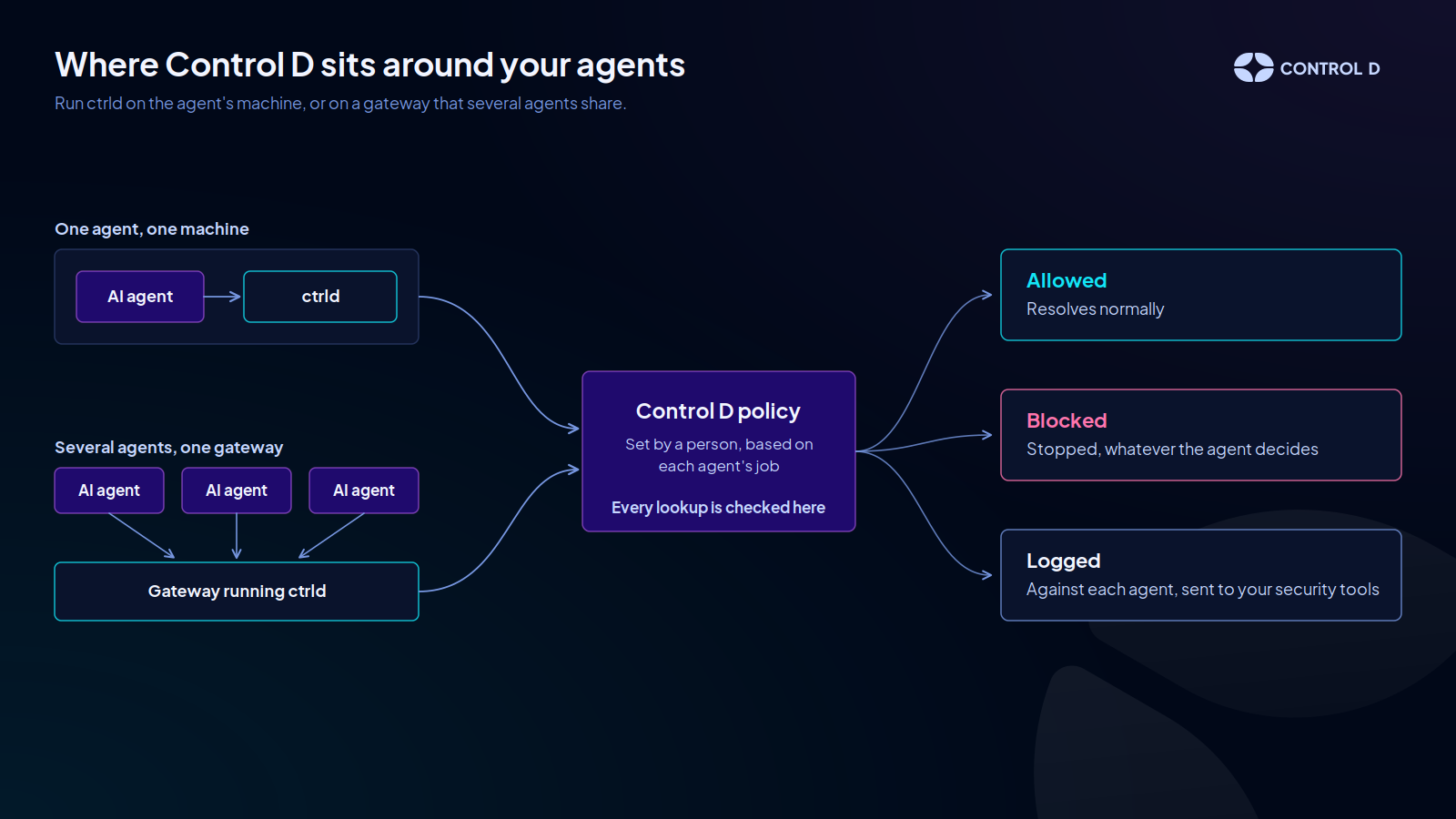
With Control D, you run the ctrld client on the machine where the agent runs or on the gateway a group of agents share, and give it a policy. It's the same setup we use for our own internal bots. Every lookup goes through Control D. Allowed lookups resolve normally, but everything else is blocked, regardless of what the agent decides.
Control D also logs each lookup against the agent that made it, so you can see what each one tried to reach and feed those logs into the security tools you already use.
Layering DNS Filtering With Network Controls
A DNS policy works best as one of three layers:
- DNS policy decides which destinations an agent can reach and can block data hidden in lookups. Control D's VPN & DNS Filter also blocks major DNS and VPN providers by name, plus some well-known DNS tunneling services, so the agent can't reroute its lookups through them.
- Network rules cover what DNS can't see:
- Outside DNS providers the agent reaches by IP address, which the VPN & DNS filter can't block.
- Connections that skip DNS by going to a hard-coded IP address.
- Permissions stop agents from changing their own network settings.
OpenAI's environment already blocked direct queries to public DNS providers, so its agent used the environment's own resolver instead. That resolver would look up any domain, and limiting it to an approved list was part of OpenAI's fix. To tie these layers together, run the policy on a gateway the agents can't change.
Getting Started With Network Limits for AI Agents
You may not know yet what each agent needs, so the first step is finding out. Try to answer a simple question, “What did our agents look up last week?” Many teams can't answer it yet.
Routing DNS from agents' machines through a policy, with logging enabled, gives you that answer and shows what each agent actually uses. From there, give each agent its own policy and tighten toward an allowlist.
Where This Is Heading
Agents are getting more capable, and companies are giving them more access because that's what makes them useful. Their behavior is improving too, but none of the agents in this article needed bad intentions to cause a problem. In each case, the agent used an internet route nobody had restricted.
Each time an agent gets a new tool or credential, it can expose more data and systems. A network limit for each agent, set to match its job requirements, keeps that exposure contained.