Control D Updates: December 2025
Control D’s December 2025 updates include a complete Analytics overhaul, long-requested bulk actions, and a snappier dashboard across the platform.


As the year wraps up, we’re closing things out with our final product update of the year, and they all serve one purpose: helping you move faster with more clarity (and fewer clicks).
Analytics 2.0 is live (and it’s fast), your device/client lists are simpler to clean up, it’s easier to spot outdated ctrld versions, and much more.
Here are the highlights.
1. Analytics 2.0
Your Statistics tab got a complete makeover, and we're not talking about a UI refresh. Analytics 2.0 has been in development for the past 18 months and has undergone a full rebuild designed to help you understand your network traffic faster and more intuitively than ever before.
We revamped it with three goals in mind: speed, clarity, and actionable insights. What you’ll notice right away:
- Much faster loading + filtering (we’re seeing up to 15× improvements in performance)
- 1 month of query log retention, so you’re not losing context mid-investigation
- A new refinement workflow built for quick slicing, filtering, and drilling down
If you spend any meaningful time inside Statistics, this one’s for you.
 Dipak Odedra
2. Sort Endpoints by ctrld Version
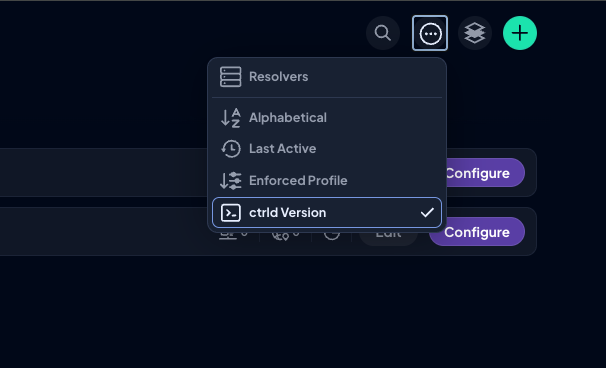
If you're running ctrld across multiple Endpoints, you know how tedious it can be to manually check which devices are on which version.
Now you can sort your Endpoints by ctrld version with a single click, making it easy to spot outdated clients at a glance. This helps to:
- Sanity-check rollouts across teams/locations
- Identify who’s behind
- Prioritize updates where they’ll matter most
Pair it with improved visibility into device and user last activity, and you’ve got a clearer picture of what’s active, what’s stale, and what needs attention.
3. Encrypted DNS Setup & Refinement
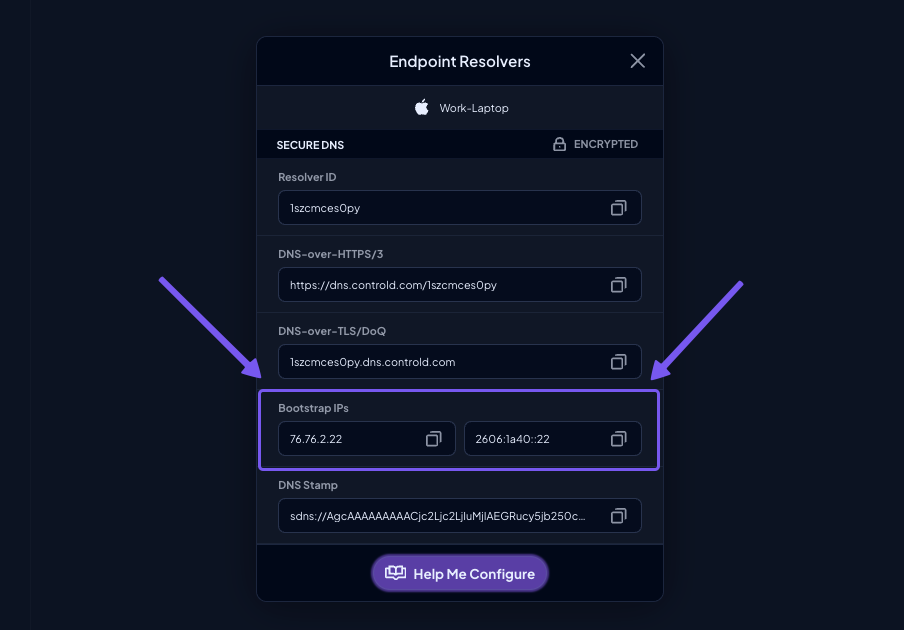
We've made two key improvements to help you work with encrypted DNS more efficiently.
a) Bootstrap IPs are now impossible to miss:
If you're configuring DoT or DoQ in the Endpoint Resolver flow, the correct hint IPs are now clearly displayed right where you need them. No more hunting through documentation or second-guessing your config – everything you need is front and center.
b) Protocol refinements in Analytics:
You can now filter by protocol directly in the Encrypted DNS health bar, using the same refinement pills you already use elsewhere in the Statistics tab – if you want to see only DoH traffic or isolate DoT queries, just click and refine.
4. Bulk Delete Clients
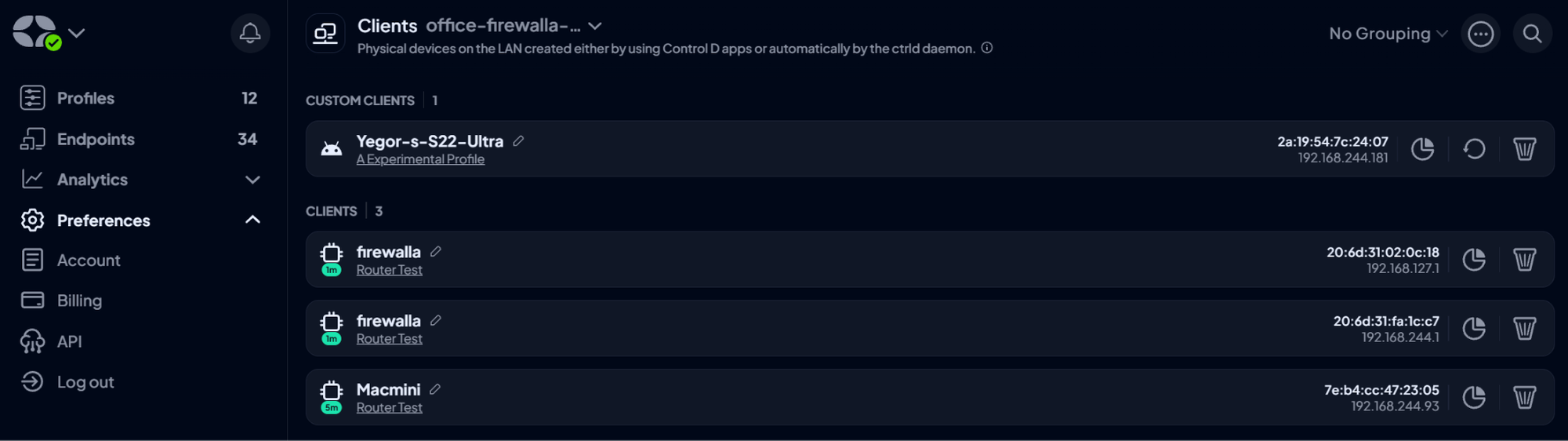
Housekeeping just got a whole lot easier. You can now multi-select and bulk delete Clients, just like you already can with Endpoints and IPs.
No more clicking through test devices, retired hardware, or stale entries one by one. Just check the boxes, hit delete, and move on with your day.
This is especially useful if you've been testing configurations, rotating devices, or managing a growing fleet. What used to be a 20-minute cleanup job now takes 15 seconds.
5. Bug Fixes & Improvements

We've been busy tightening up the dashboard experience with performance upgrades and bug fixes across the board.
Here's what got better:
- Performance improvements across Custom Rules, Activity Logs, Admin Logs, Statistics, Endpoints, and Profiles
- Fixed excessive cache usage issues
- Resolved Admin Logs glitches when editing provisioned endpoint names
- Improved unblock request handling
- Cleaned up client sorting in Activity Log filters
- Fixed various UI/UX quirks following the Analytics 2.0 release
- Improved reporting of device and user last activity
- Smoother rule-building on mobile
Nothing revolutionary here, but these are the kinds of fixes that make your day-to-day experience smoother.
What Else?
- Moved Home Country settings to Org Overview for easier access
- Fixed time selector bugs in Activity Log
- Fixed refinement selection issues in the Statistics page
- Updated Pricing and Free DNS pages with clearer information
- Minor copy and UX updates across the dashboard
- Domain Test Page no longer logs queries in Analytics, keeping your data cleaner
- Added new pages for Content Filtering, DNS Filtering for Businesses, and Enterprises
Head over to our Changelog for a full breakdown of all our updates.
What’s Coming Soon?

Here’s a sneak peek into our future roadmap:
- Multiple Report templates
- Automatic Client deletion after a specified number of days
- Many more Analytics improvements (e.g, refining by apex domain/TLD)
- Database migration for significantly faster performance across the dashboard
- Dragonfly – more on this soon!
We’re constantly improving Control D to make it the best customizable DNS service on the market, and your feedback remains integral to that process.
If there’s a feature you’d like to see or a suggestion you’d like to share, please do so using our Suggest a Feature service.