Shadow IT Discovery with DNS Analytics
How DNS analytics helps you discover shadow IT and unauthorized apps, where it falls short, and how to act on what you find.

If you run IT or security, some of the apps your staff relies on have never crossed your desk. That is shadow IT, the unsanctioned tools and services running without sign-off, and it matters because those tools are where sensitive data quietly ends up and compliance gaps open.
You have probably heard that DNS logs can find it, and they can, for a simple reason.
Every app has to look up a domain before it loads, so it shows up in your DNS data before a connection is even made. That record tells you the app and the device that reached for it.
DNS does not tell you everything, though. This guide covers what DNS analytics finds, what it misses, and what to do once you spot unauthorized technology on your network.
TL;DR
- Every app resolves a domain before it loads, so your DNS logs already show the shadow IT on your network, including the free and browser-based tools other methods miss.
- Spot it by filtering your logs for a few patterns: unapproved apps, sudden spikes, activity in categories you never enabled, and signs of someone dodging your resolver.
- DNS is especially good at catching shadow AI, since AI tools call a provider domain even when nobody rolled them out.
- DNS shows you the app and the device, not who signed in or what data moved, so pair it with an identity or endpoint signal.
- Once you find something, act in the same layer: block it, approve it, or replace it.
How DNS Analytics Detects Shadow IT
DNS analytics detects shadow IT because every app resolves a domain before it loads, and DNS filtering tools like Control D log those requests. That single record is enough to reveal an unsanctioned tool and the device using it.
When someone opens an unsanctioned app, their device asks a resolver to turn the app's domain into an IP address. Control D logs that query with three details:
- The domain requested
- The device or IP that asked
- The time it happened
The app is now on record, before it has loaded anything.
This is why DNS analytics casts such a wide net. It catches anything that touches the internet, whether it is installed software, a browser-based tool, or a site someone just opened in a tab, because all of them resolve a domain first.
That holds whether someone bought the tool or is testing its free tier, got it approved or not, or signed up with a personal email.
Other methods have gaps:
- Endpoint agents miss devices they are not installed on
- Firewalls miss anyone working off the corporate network
DNS resolution happens on every connection. Control D can run at both the resolver and the endpoint, so the record follows users off-network instead of stopping at the office door.
How to Spot Shadow IT in Your DNS Logs
You spot shadow IT by filtering your DNS logs for a handful of patterns that separate unsanctioned tools from ordinary traffic. The evidence is already there.
The problem is volume: organizations routinely discover more SaaS applications and cloud usage than they expected, often several times what IT departments officially manage.
Most of that is noise: ad trackers, CDNs, and vendor telemetry resolving all day, unusual destinations and unfamiliar subdomains mixed in with the tools employees actually use. Categorization is what makes the log readable.
Control D sorts every domain into a Filter category and tracks over 1,000 individual Services, from Dropbox to TeamViewer to ChatGPT, so you read app names instead of raw hostnames.
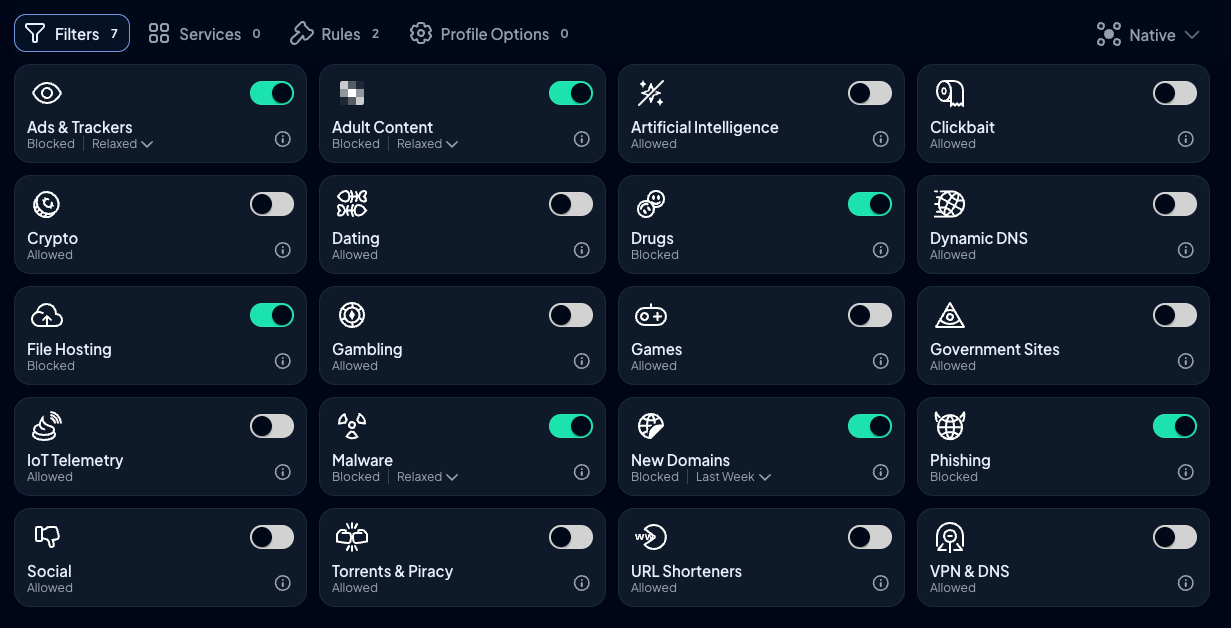
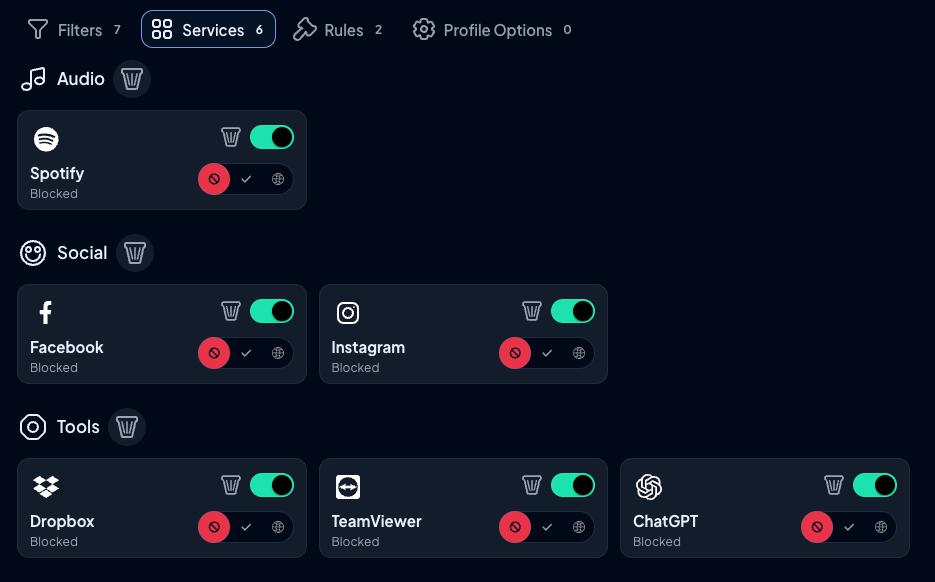
Control D offers 20 content categories and 1,000+ individual Services
From there, four patterns tell you where to look. None is proof on its own; each is a place to start.
An App Nobody Approved
Filter the log by a specific Service and ask a direct question, like which devices have reached a file-hosting or remote-access tool. You get named apps back, which you can cross-reference against your approved application list to make the unauthorized tools stand out.
A Spike or a Cluster
Anomaly detection catches unusual increases in lookups to a Service. Watch for a cloud storage app climbing over a week, or one team's devices all converging on the same domain.
Activity in a Category You Never Enabled
This is the anchor signal. Filter by a category like File Hosting or Artificial Intelligence to see the unapproved footprint and which devices it belongs to.
Signs Someone Is Dodging Your Resolver
Filter by result code to pull NXDOMAIN responses, which in unusual volume can flag a misconfigured or evasive device. The VPN & DNS category Filter covers tools built to skirt DNS policy.
All of this sits in Control D's Analytics view and Activity Log, filterable by category, Service, and result code, and the same data streams to your SIEM so you can line it up with identity or endpoint logs.
The Limits of DNS-Based Shadow IT Discovery
DNS discovery is wide, but partial. It shows you which app and which device, but not who signed in or what data moved. Three limits are worth knowing.
1. What DNS Can't See
When a personal cloud drive resolves from a work laptop, DNS tells you the app is in use and on which device. It does not tell you:
- Whether the person used a company account or a personal one
- What file they moved
DNS reads the domain, not the session or the data, so on its own, DNS analytics does not give you detailed user activity. It can flag that sensitive data may be leaving through an unapproved app, but it cannot confirm what left.
For a regulated team, that gap is where compliance violations hide, since sensitive customer data can land in an app nobody reviewed. Fully protecting sensitive data takes a layer beyond DNS.
2. Encrypted DNS
DNS pointed at a third-party encrypted resolver (DoH or DoT) never reaches yours, so those queries stay invisible.
3. Off-Network Devices
On-premises firewall logs go dark the moment a device leaves the building. This gap is the one you can close for managed devices, because Control D also runs as an endpoint agent that logs their queries on any network they connect to, which you can deploy at scale via your RMM/MDM tool.
Historic investigation needs Full Analytics switched on, so if you want to trace a past incident rather than only watch live traffic, turn it on before you need it.
DNS Analytics vs Other Shadow IT Discovery Tools
No single method sees everything, so effective shadow IT discovery benefits from combining multiple data sources, with network-level data as the base.
| Method | Coverage | Off-network | Setup | Best at | Blind spot |
|---|---|---|---|---|---|
| DNS analytics | Broad: any app that resolves a domain | Yes, with an endpoint agent | Low | The widest view of what's actually running | Account and data |
| Cloud access security brokers (CASBs) | Deep on sanctioned cloud apps | Varies | High | Cloud traffic and data inside approved apps | New, unsanctioned apps outside the tenant |
| SSO / identity provider logs | Apps behind login only | Yes | Low to moderate | Which approved apps people use | Anything not behind SSO |
| Endpoint detection and response (EDR) | Precise, per managed device | Yes | High | Installed software | Unmanaged and BYOD devices |
| SaaS management platforms | Paid and connected apps | Varies | Moderate | Tracking spend and licenses | Free apps nobody connected |
DNS analytics is the widest, lowest-effort first net, so pair it with one identity or endpoint signal to answer the account question DNS cannot.
CASBs use network traffic analysis to inspect cloud traffic and often assign each app a risk score, which is useful once you know an app exists.
SaaS management platforms are good at spend and licenses, but a tool someone signed up for today hasn't generated either yet. DNS sees it the moment it resolves a domain.
There are plenty of detection tools and security solutions in this space, but network monitoring at the DNS layer sees the broadest set of apps, which is why it belongs at the base of the discovery process.
How to Detect Shadow AI and Unauthorized AI Tools
Discovering shadow AI is close to a perfect case for DNS, because DNS analytics can detect employee use of generative AI tools even when nobody rolled them out. Almost every AI tool is a cloud service that resolves a provider domain before it runs, so it leaves a DNS record where other discovery methods see nothing. A browser-based assistant slips past:
- SSO, if the user signed in with a personal account
- Expense reports, because most tools have a free tier
- EDR, because nothing gets installed
That is how shadow AI tools surface. Control D tracks the major providers (ChatGPT, Gemini, Claude, Copilot) as named Services under the Artificial Intelligence category, so you filter by that category and get a direct list of which AI tools are in use and where.
On Control D's Full Metal Packet podcast, ISO 27001 lead auditor John Verry said most SaaS products now ship AI features and that a typical thousand-person company already runs over a hundred AI use cases, almost none reviewed. Those are his figures, not a verified benchmark, but they track with what security teams are seeing.
Although DNS cannot read the prompts or the sensitive information leaked inside, it shows you the usage and helps find the exposure.
How One IT Team Uncovered Shadow IT with DNS
The Corporation of Massey Hall and Roy Thomson Hall runs IT for two of Toronto's busiest concert venues, covering public Wi-Fi and a hybrid workforce across both sites.
After moving its DNS filtering to Control D, the team gained real-time insight into DNS activity across the internal network, and that visibility surfaced apps and services departments were using without IT approval.
IT manager Neil Bowen was clear about the intent. The team was not trying to invade privacy. DNS analytics showed which apps were in use at the device and network level, without the keystroke tracking that turns discovery into surveillance.
What to Do After You Discover Shadow IT
Once you find an unsanctioned app, decide whether to block it, approve it, or replace it, and enforce that in the same DNS layer that surfaced it. Most discovery tools stop at the report and leave enforcement to something else.
The tool that found the app can also act on it. Keeping discovery and control together removes that handoff, which is how DNS analytics helps organizations gain control over their shadow IT environment.
A simple loop works:
- Assess the risk: A team using an unapproved planner is a different security risk from client data in a personal cloud drive or an app with known security vulnerabilities
- Decide: Block the app, approve it, or replace it with a sanctioned option that has proper security controls and access management
- Apply and log it: In Control D, blocking or allowing an app is a toggle on the relevant Service or Filter, and every action is recorded for your audit trail
To manage SaaS application usage over time rather than in one-off audits:
- Scheduled reports give you regular breakdowns by top domains, users, categories, and actions, so risky apps surface on a schedule instead of by luck
- Continuous monitoring of DNS requests through the real-time Activity Log allows for early discovery, while historic data (with Full Analytics on) supports investigation after the fact
- SIEM streaming feeds the same records into your alerting, and correlating DNS logs with your other security telemetry strengthens threat detection, so you catch security incidents earlier when a suspicious domain lines up with an endpoint or identity alert
Shadow IT usually points to a gap in your approved tools stack. People reach for outside apps when the sanctioned ones fall short, so treating what you find as feedback rather than a list of violations tends to build a healthier process than blocking everything and bracing for the next workaround.
It also gives you tighter access controls, since every tool you bring in through the front door is one you can actually govern. For how discovery and enforcement fit into a wider program, see our enterprise DNS security guide.
Final Thoughts
Shadow IT is not going away, and AI tools are only adding to it, but you don't need a heavy new platform to get a handle on it.
Because every app resolves a domain, your DNS data already holds the widest view of what is actually running on your network, including the free and browser-based tools that slip past everything else.
DNS will not tell you what data moved, so pair it with an identity or endpoint signal where that matters. Start with the logs you already have, and turn what you find into action in the same layer.
If you want to see what shadow IT is already running on your network, try Control D free for 14 days (no credit card required).
Frequently Asked Questions (FAQs)
Can DNS filtering alone find all shadow IT?
No. DNS finds any app that resolves a domain, which is most of them, but it cannot tell whether someone used a company or personal account, and it cannot see what was uploaded. Encrypted DNS sent to a third-party resolver can also route around it. Pair it with an identity or endpoint signal to cover those gaps.
How is DNS different from a CASB?
A CASB goes deep on cloud apps you already sanctioned and can inspect the data inside them. DNS analytics goes wide across everything that touches the internet, including the free unauthorized SaaS applications a CASB misses because they sit outside your tenant. They do different jobs and often run together.
Does DNS-based discovery mean monitoring employees?
It shows apps and domains at the device and network level, not keystrokes or activity timelines, so it can stay on the visibility side rather than surveillance. That is the line the Massey Hall and Roy Thomson Hall team drew when they found unsanctioned tools without tracking individual behavior.
Can DNS analytics detect AI tools like ChatGPT?
Yes. AI tools resolve their provider's domain before they load, so they show up even when nobody set them up. Control D tracks the major ones as named Services so security teams can filter for AI usage directly.
What do I do once I find an unauthorized app?
Assess the risk, then block it, approve it, or replace it with a sanctioned alternative, and keep the record for your audit trail. Because discovery and enforcement sit in the same DNS layer, you can act without switching tools.