Dragonfly: AI-Powered Domain Classification at Scale
Dragonfly classifies domains and URLs in real time using LLMs, powering automated blocking and analytics at scale.


Every day, millions of domains come online. Some are legitimate businesses launching new products. Others are sophisticated phishing schemes designed to steal credentials. Some are newly registered infrastructure domains that will never see a human visitor. Others are content farms, gambling sites, or worse.
Traditional rule-based systems can’t keep up. Simple pattern matching fails against evolving threats. Classical machine learning requires massive labeled datasets and struggles with novel patterns. The process for updating the list can be difficult for non-technical support staff. We needed something smarter - a system that could understand context, reason about multiple signals, and explain its decisions.
What Dragonfly Does
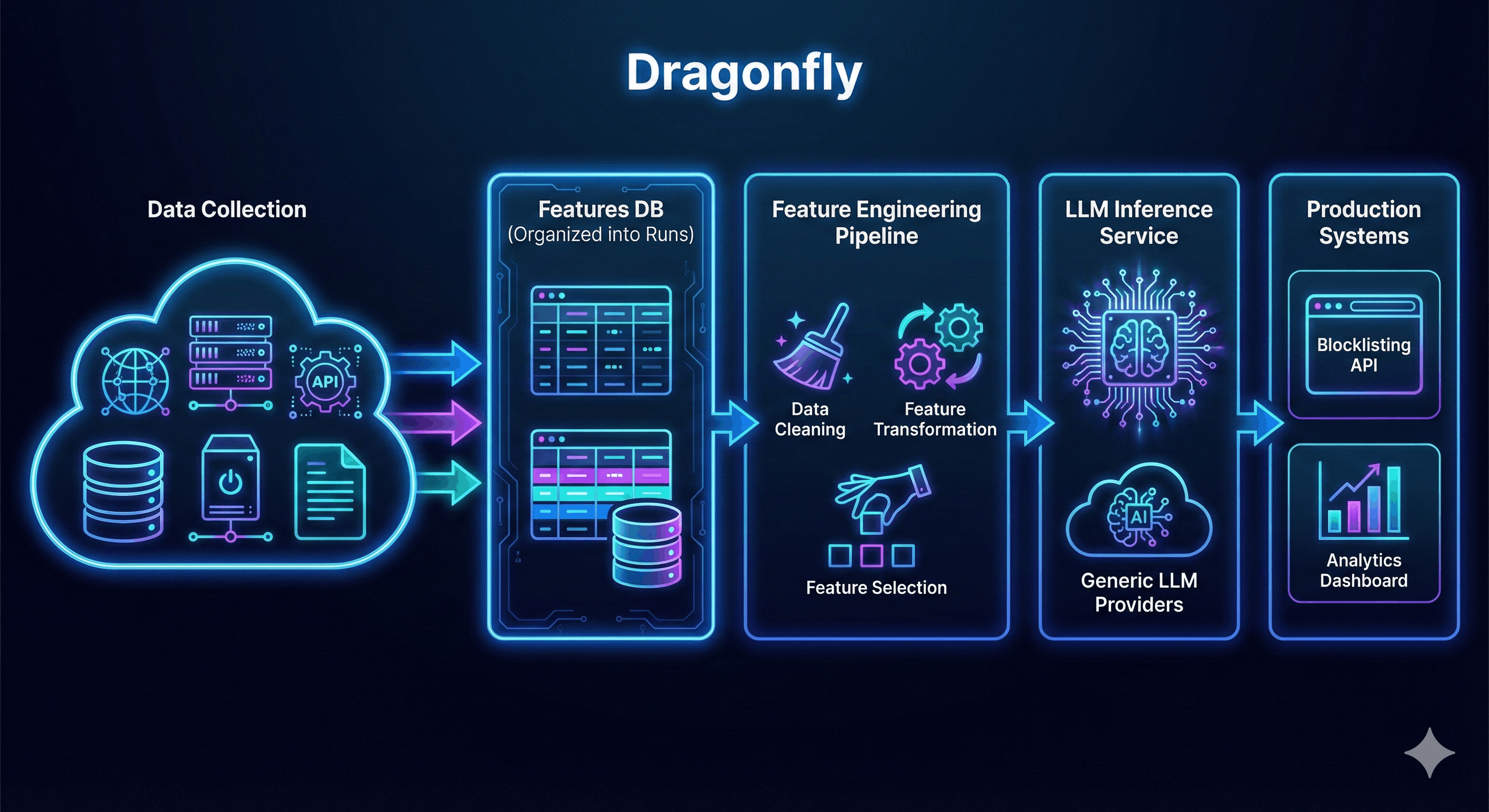
Dragonfly is a production system that classifies domains autonomously. It gathers information from a large variety of data sources, processes the raw data through a feature engineering pipeline, and uses LLMs for intelligent classification into various categories such as phishing, e-commerce, government, adult content, gambling, and more.
These classifications enable other production systems like blocklisting and analytics to operate at a scale and sophistication that manual labor simply cannot achieve.
System Architecture
The overall system can be broken into three major components:
- Data Gathering
- Feature Engineering
LLM Inference
Data Gathering
Having as much information about a domain as possible is key to understanding it. If you asked someone, “What is xyz.com?”, they likely wouldn’t be able to tell you without some digging. LLMs are the same: unless it’s a well-known domain in their training corpus, they won’t be able to classify a domain without additional context.
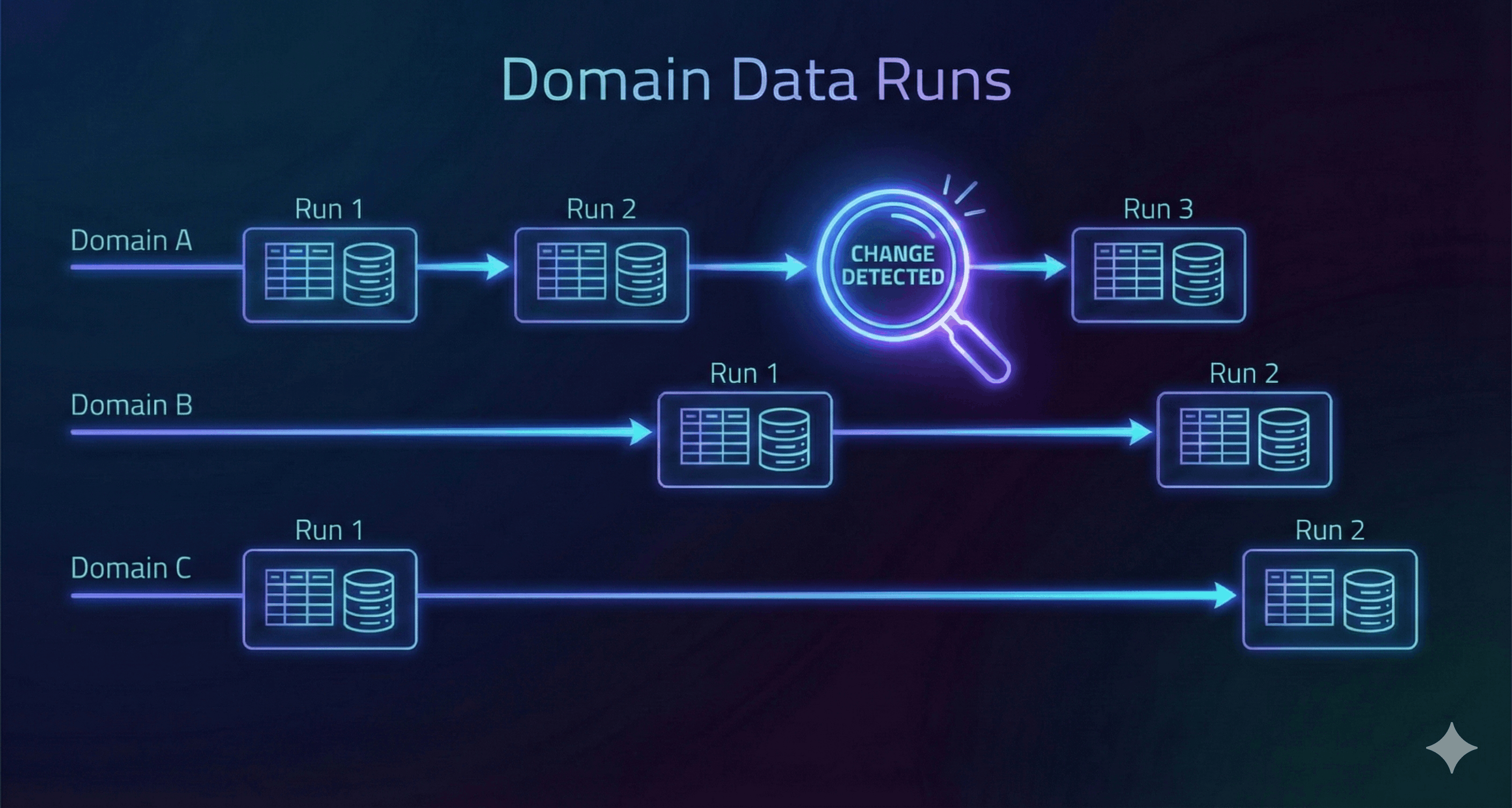
Our data gathering approach organizes information into runs - a complete collection of data gathered for a specific domain at a point in time. Each domain can have multiple runs, allowing us to build a historical view of how that domain has evolved. We can schedule a run whenever we want: when a user explicitly requests fresh data, when we notice a domain is receiving unusual amounts of traffic, or simply because the domain is popular enough to warrant regular monitoring.
This run-based architecture solves several critical challenges. By maintaining a historical record of runs per domain, we can identify domains that have been stable for years versus those constantly undergoing changes. This temporal context proves invaluable for classification accuracy and helps us spot domains that frequently rotate their content or infrastructure.
When we’re ready to classify a domain, we use its latest run to combine all feature data together for the downstream pipeline stages. This approach also enables us to test the entire system against static snapshots of data in a reliable, repeatable fashion. This independence from upstream data providers means we can run experiments quickly without waiting on external dependencies or dealing with data that’s changed mid-analysis. We call a group of related data and signals a feature, and Dragonfly gathers multiple features for each domain under analysis.
Feature Engineering
Once we have the data tucked safely away, we have to do some cleanup and formatting. This is called feature engineering. In our experiments, we have observed that feature engineering is critical to LLM performance. How you present the data is often as important as the data itself. Furthermore, this stage allows us to select which features - and which feature combinations - we want to test.
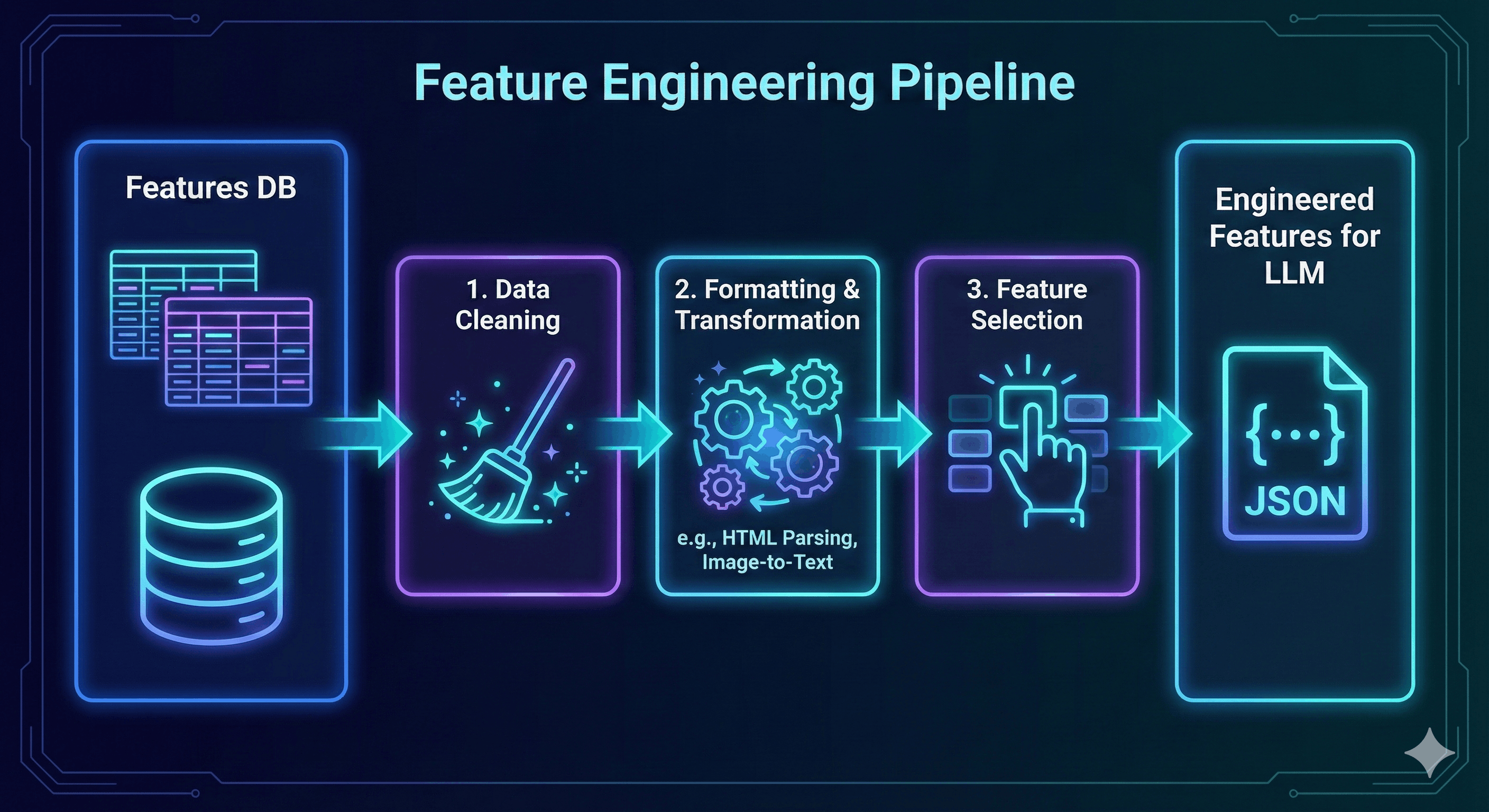
This pipeline is built on top of the raw feature data stores, enabling us to make changes and evaluate performance in a very quick, iterative way without the headaches of re-collection. For example, we transform screenshots of websites into formats that LLMs can understand and extract useful structured information from raw HTTP response bodies. The key insight here is that raw data rarely arrives in a form that’s optimal for LLM consumption - thoughtful transformation and curation dramatically improves classification accuracy.
LLM Inference
Once we have our data nice and clean, it’s time to classify it. Our system utilizes LiteLLM along with some additional supporting libraries to swap LLM providers at will. This allows us to stay up to date with the latest and most cost-effective models at the flip of a config.
LiteLLM gives us access to a wide ecosystem of providers and models. We actively work with OpenAI’s models (GPT-4o, GPT-4o-mini, and their reasoning models like o1, o3, and o4-mini), Anthropic’s Claude family (Sonnet and Opus), X.AI’s Grok series, Google’s Gemini Pro and Flash, and over 100 other providers. This flexibility means we can run experiments comparing different models’ performance on domain classification tasks, or quickly adopt new models as they’re released.
The system handles two distinct API formats seamlessly. Most models use the standard Completions API, but OpenAI’s reasoning models require the Responses API, which has a fundamentally different architecture. Rather than standard temperature and top_p parameters, these reasoning models use “reasoning effort” levels - low, medium, high, or max - that control how much compute the model allocates to thinking through the problem. Our abstraction layer handles these differences transparently, allowing us to experiment with reasoning models without rewriting our inference pipeline.
Legacy Approach (/v1/chat/completions)
You must resend the entire book every time you want a new page.
{
  "messages": [
    {"role": "user", "content": "Hi"},
    {"role": "assistant", "content": "Hello!"},
    // ... [18 more messages usually hidden here] ...
    {"role": "user", "content": "Summarize what we just discussed."}
  ]
}- Payload Size: HUGE (and grows with every turn).
- Developer Burden: High (You must manage the database of history).
Modern Approach (/v1/responses)
You only send the new message and a "pointer" to the past.
{
  "input": "Summarize what we just discussed.",
  "conversation_id": "conv_abc123" // <--- The magic link
}- Payload Size: Tiny (Constant size).
- Developer Burden: Low (OpenAI manages the history).
In production, LLMs don’t always return perfectly formatted responses. Our service includes robust parsing that handles common quirks: stripping markdown code blocks from JSON responses, using brace counting to extract complete JSON objects from messy outputs, and categorizing errors (rate limits, timeouts, authentication failures, model availability issues) for better monitoring and debugging. This defensive engineering ensures that minor LLM output variations don’t cascade into system failures.
Configuration-Driven Classification: Changing Behaviour Without Deploying Code
Production machine learning systems need to be nimble. You discover a new model works better. Your prompts need fine-tuning. You want to test different combinations of data. Traditionally, each of these changes requires modifying code, running tests, and deploying updates, which is a process that can take hours or days.
Dragonfly takes a different approach: classification behaviour is controlled through database settings. The system loads an “active configuration” from the database, caches it for a few minutes, and uses those settings for all classification decisions. Change the database, and within minutes, the system adopts new behaviour.
What Lives in a Configuration
A configuration is stored across four interconnected database tables:
- Model settings define which AI model to use (like GPT-4), along with parameters that control its behaviour - temperature for creativity, token limits for response length, and other fine-tuning dials.
- Prompts are the actual instructions we give to the AI - around 4,800 words of carefully crafted guidance. Each unique prompt gets stored once with a unique identifier. Configurations reference this identifier rather than duplicating the full text.
- Classification configurations connect everything together - which model to use, which prompt to follow, how to format the data, and whether this configuration is currently active.
- Feature settings specify exactly what information to include. For a domain name, this might mean DNS records, geographic location, and security certificates. It gets granular: you can specify “only these specific types of DNS records” to optimize performance.
How the System Retrieves Configuration
Every classification request checks: “Do I have a fresh configuration cached?” If yes, use it. If the cache expired (after five minutes) or doesn’t exist, query the database for whichever configuration is marked active.
The database returns the complete recipe - model type, prompt identifier, features, and all tuning parameters. This gets cached, validated to ensure it’s complete, and then used for all requests during the next five minutes.
The validation catches issues like requesting features without specifying which ones, rejecting broken configurations before they can cause problems.
How Configuration Drives the Pipeline
The configuration guides classification through three stages:
- Feature retrieval: The feature list determines what information gets pulled from the database. Granular settings provide surgical control - for DNS records, you might specify “only address records, mail servers, and text records” rather than everything available.
- Formatting: The configuration specifies how to present data to the AI. Minimal and concise? Rich with context? Different formatting styles work better for different tasks.
- AI inference: The system retrieves the actual prompt text using its identifier, packages it with formatted features, and calls the AI model with all specified parameters.
The Prompt Storage System
Storing 4,800-word prompts in every configuration would be wasteful. Instead, prompts live in their own table. Configurations reference them by identifier, and the system keeps the 20 most recently used prompts in a quick-access cache.
This enables multiple configurations to share the same prompt, creates an audit trail (every classification records which prompt was used), and maintains a complete history of all past prompts.
Feature Selection: Surgical Precision
Feature settings enable optimization experiments. Consider DNS records: without filtering, the system might send seven different record types to the AI. Through experimentation, you might discover only five types actually matter for accurate classification. Configure the system to include only those five, reducing token costs without sacrificing accuracy - no code changes required.
Making Changes and Rolling Back
To switch configurations: mark the current one inactive, mark a different one active. The change propagates when the cache expires - up to five minutes. For emergencies, manually clear the cache for immediate effect.
Classifications in progress complete with their original configuration. Historical configurations never get deleted, so you can reactivate any previous setup. This makes bold experiments safe, as you can always roll back.
Every classification records which configuration produced it, creating a detailed audit trail. If a domain’s classification changes over time, you can trace exactly which configuration change caused it.
From Experiment to Production
Research experiments use YAML configuration files with the same structure as production database tables. When an experiment shows promising results, insert those parameters as a new database configuration, flip the active flag, and within five minutes production adopts the experimental approach.
What This Enables
The system evolves through configuration changes, not code deployments. This architecture makes Dragonfly adaptable enough to keep pace with how quickly machine learning models and techniques advance so that testing improvements becomes routine rather than risky.
Experimentation
We ran over a dozen experiments while building Dragonfly’s classification system. Here are four that fundamentally changed how we think about LLM engineering in production.
Finding 1: The More We Explained, The Worse It Got
We built five different formatters to prepare domain data for our LLM.
Our hypothesis: more context and explanation would help the model make better decisions.
The formatters ranged from minimal to comprehensive:
- Minimal: Raw JSON with section headers
- Semantic: Human-readable bullet points with natural language
- Enhanced Semantic: Detailed summaries, explanations of technical concepts, security risk interpretations
The Enhanced Semantic formatter was what we expected to perform best. It added context like “WHOIS data provides registration information about who owns a domain” and interpreted technical fields: “This is an established domain with 5+ year history, suggesting legitimacy.”
Our expectations were wrong - the Enhanced Semantic formatter performed poorly.
| Configuration | Duration(s) | Accuracy | Total Tokens |
|---|---|---|---|
| Standard | Baseline | Baseline | Baseline |
| Enhanced Semantic | 72.45% | -1.82% | -17.17% |
| Semantic | -3.06% | -1.16% | -23.23% |
| Structured Raw | -1.02% | 0.99% | -4.04% |
| Minimal | 7.14% | 1.65% | 1.01% |
Table 1: Experimentation results for various prompt formats.
The minimal formatter - basically raw JSON with section headers - outperformed everything else. It was 3.54% more accurate than our carefully crafted Enhanced Semantic format and 37% faster.
Why did this happen?
We think the LLM doesn’t need hand-holding. Adding explanations like “this field means X” was redundant: the model already understood technical concepts. Worse, our helpful context might have introduced bias or noise that confused the classification logic.
The lesson: Don’t assume LLMs need the same scaffolding humans do. Sometimes the simplest approach wins.
Finding 2: The Screenshots
Website screenshots seemed like an obvious win for classification. Visual signals matter. You can spot a gambling site or adult content at a glance. But sending images to vision-capable LLMs is expensive (GPT-4o charges about 765 tokens per image).
We had recently enhanced our screenshot pipeline to not just capture images but also extract the rendered text from the page. This gave us two options:
- Send the screenshot image to a vision model
- Send just the extracted text
We tested three configurations against our 1,489-domain test set:
| Configuration | F1 Score | Accuracy | Cost per Run |
|---|---|---|---|
| No screenshot data | Baseline | Baseline | Baseline |
| Screenshot text only | 3.57% | 5.17% | 10.08% |
| Screenshot + image | 2.27% | 4.17% | 19.00% |
Table 2: Experimentation results for screenshot content
Screenshot text improved F1 by 3.6%. Adding the actual image made it worse.
The text-only approach captured everything we needed: the rendered content after JavaScript execution, dynamically loaded elements, text hidden in images via OCR. But without the cost and complexity of processing images through vision models.
Why did the image hurt performance?
Our theory: images added noise. The model had to parse visual layout, colours, design elements… none of which mattered for categorization. The text contained the signal.
Plus, the image approach was slower by 25% and more expensive by 9%.
The lesson: Extract the signal, discard the medium. We don’t need to send screenshots when we can send what the screenshot contains.
This pattern applies beyond images: often the derivative (extracted text, summarized data, parsed structure) is more valuable than the raw artifact.
Finding 3: When Every Model Fails The Same Way
We benchmarked four different models to find the best classifier:
| Model | F1 Score | Processing Time | Standout Feature |
|---|---|---|---|
| Grok-3-mini | Baseline | Baseline | Best cost/performance ratio |
| DeepSeek Reasoner | -0.18% | 227.42% | 73% accuracy when confident |
| Gemini 2.5 Flash | 1.28% | -12.90% | Fastest processing |
| GPT-4.1 | 2.92% | -23.39% | Best overall |
GPT-4.1 won, but barely. All five models clustered around a f1 score. No model had a breakthrough.
When different architectures (OpenAI’s GPT, Google’s Gemini, X.AI’s Grok, DeepSeek’s reasoning model) all struggle with the same categories, the problem isn’t the model - it’s the data.
Either our training labels were inconsistent, or we weren’t providing the right features for those categories. You can’t prompt-engineer your way out of a data quality problem.
Finding 4: Token Economics: What It Actually Costs to Classify Millions of Domains
When building an LLM-powered classification system, token usage directly translates to your monthly bill. Here’s the complete breakdown of where tokens go and what we learned optimizing for production economics.
Anatomy of a Classification Request
Every domain classification sends two messages to the LLM: a system prompt and the user content with features. Here’s the token breakdown:
System Prompt (cached across requests):
- ~4,800 tokens total
- Category definitions and descriptions: ~2,400 tokens (26 categories with detailed explanations)
- Task instructions and guidelines: ~1,800 tokens
- Output format specification with examples: ~600 tokens
- Cached using prompt caching, so only charged once per session
Per-domain Input:
- Web content: ~3,300 tokens (61% of input)
- Page text, rendered content, visual text extraction
- Domain infrastructure data: ~2,100 tokens (39% of input)
- Network configuration, security certificates, registration data, etc.
- Total domain input: ~5,400 tokens per domain
Output (LLM response):
- JSON with categories, reasoning, confidence: ~150-200 tokens
Total per domain: ~10,000 tokens (input + output)
The HTTP body text dominates token usage. A typical web page contains 2,000-4,000 words of text - product descriptions, articles, terms of service, navigation text. This is both the most expensive feature and the most valuable signal.
The HTML Optimization Experiment
Initially, we sent full HTML to the LLM - every <div>, every <span>, every CSS class and attribute:
<div class="product-grid container">
  <div class="row">
    <div class="col-md-4 product-card">
      <img
        src="/casino-slot.jpg"
        class="img-responsive"
        alt="Mega Fortune Slots"
      />
      <h3 class="product-title">Mega Fortune Slots</h3>
      <p class="description">Progressive jackpot...</p>
    </div>
  </div>
</div>
Full HTML approach:
- Average: 17,000 tokens of HTML per domain
- Total per experiment (1,489 domains): 25.3M tokens
- Cost with gpt-4o-mini: $7.60 per run
- Processing time: 25 minutes
We tested three approaches to reduce this:
| Approach | Tokens/Domain | Cost/Run | F1 Score | What We Did |
|---|---|---|---|---|
| Full HTML | Baseline | Baseline | Baseline | Send complete HTML with all tags |
| Dense HTML | -67.06% | -67.11% | 0.00% | Minified HTML, removed whitespace |
| Text Only | -85.29% | -77.63% | -0.18% | Stripped all tags, kept text only |
Result: 78% cost reduction, same accuracy, extracted text won.
The LLM doesn’t need HTML structure - it needs the content. Stripping <div class="product-title">Mega Fortune Slots</div> down to “Mega Fortune Slots” eliminated noise without losing signal.
Model Cost Comparison (1M Classifications)
We tested multiple models to understand the cost-performance tradeoff:
| Model | Input $/1M Tokens | Output $/1M Tokens | Cost per Domain | Cost per 1M Domains | F1 Score |
|---|---|---|---|---|---|
| gpt-4o-mini | $0.15 | $0.60 | Baseline | Baseline | Baseline |
| gpt-4o | $2.50 | $10.00 | 775.00% | 775.00% | 1.41% |
| o3-mini (low) | $1.10 | $4.40 | 275.00% | 275.00% | 0.16% |
| o3-mini (high) | $1.10 | $4.40 | 1400.00% | 1400.00% | 3.29% |
| Grok-3-mini | $0.12 | $0.48 | -25.00% | -25.00% | -14.24% |
- o3-mini high effort uses significantly more output tokens due to reasoning
Looking Forward
Dragonfly works. Our experiments proved we can classify domains accurately using LLMs at a reasonable cost. Now we’re focused on two things: scaling up classification volume as performance improves, and integrating these classifications into production systems.
More to Share
This article covered the architecture and our most impactful experiments. There’s more to talk about - the engineering decisions that went into building a reliable inference pipeline, lessons learned from prompt iteration, patterns for managing configurations at scale. We’ll share more as we continue developing the system.
Production Integration Ahead
The real goal isn’t just classifying domains - it’s using those classifications to make our systems smarter. Next on the roadmap: feeding Dragonfly’s output into our blocklist system, powering analytics with category data, and building automated workflows that respond to classification signals.
We’re also exploring multi-label classifications, confidence scoring, and temporal analysis to track how domains change over time. The foundation is solid; now we’re building on top of it.
Join Us
Building production LLM systems that actually work is hard. Managing token costs at scale, designing experiments that produce clear answers, shipping reliable inference pipelines - these are real engineering problems without obvious solutions.
If that sounds interesting, we’re hiring. We work with the latest models from OpenAI, Anthropic, Google, and others. Our team experiments frequently, iterates quickly, and focuses on systems that scale.
Interested? Check out open positions at https://x.com/windscribecom/jobs or reach out to hello@controld.com.